Posts

Certificate requirements for internal Lync servers

Lync is quiet strict in certificate validation. If you assign a non compatible certificate to Lync it will run into serious issues. This is most likely happen if you are using dedicated certificate for each Lync service. Especially the Lync WebServiceInternal certificate cannot be requested correctly, neither with Lync Wizard nor with the Request-CsCertificate command. Here the problem is that both methods are requesting a certificate with a Subject Name of the Internal Web Services rather than the POOL FQDN. Lync BUG: The remote certificate is invalid according to the validation procedure. reason="The web ticket is invalid." ;faultcode="wsse:InvalidSecurityToken",Replace=false In both, the TechNet and Help File the correct certificate is described. Therefore you need a valide process of requesting the correct certificate. If you have a consolidated certificate for all services, this is issue is not present, because the Subject Name responds to the POO...
Lync Edge Server or Pool Server have uncommon call drops (30sec) and other IM issues

I came across a funny problem. I customer complained if a federated call was initiated the call always dropped after exactly 31 seconds. What we could figure out was this error message. SIP/2.0 504 Server time-out ms-client-diagnostics : 52085;reason="Dialog does not exist" So I continued the analysis and traced the calls. With the wonderful tool SNOOPER, I was able to get a see the "Call Flow Windows", which is really a very helpful visualization of the exact package flow. I saw now the SIP Session was initiated correctly. BUT I figured out, the PRACK message was not acknowledge, so the ACK 200/OK was missing. Even the message was send correctly the target host. "This is a kind of early media." The Voice stream is established, but need to be reconfirmed in case some port/ parameter should be changes/ optimized. Since the ACK is missing, truly the Lync Server must think the call has ended and actively dropped it. This all is happened on the...

Lync 2013 Reverse Proxy Solution with IIS ARR (Application Request Routing) - Instllation and Consulting guide

Image
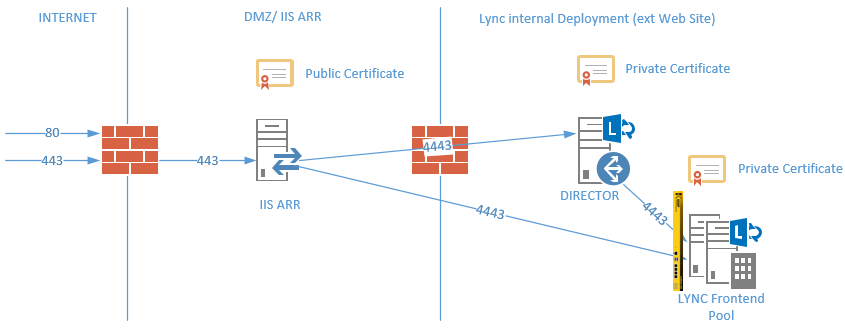
Before we start with the Lync 2013 Reverse Proxy solution design and setup guide. I want to keep some supportability statement in mind. By today, the date of writing this blog, Microsoft has to supported solutions. 1. Microsoft TMG (Thread Management Gateway) - if the TMG was purchased before the EOL date. 2. Microsoft IIS ARR (Internet Information Server Application Request Routing) A third solution, the Microsoft Web Application Proxy introduced with Windows Server 2012 R2 is not jet supported. This is due to the reason that WAP has a problem with multiple SIP Domains, meaning here: I cannot handle requests other than for the primary SIP domain, especially the MEET simple URL. The configuration guide here runs through the entire process from the ISS ARR Installation and setup. The guide concentrates on Windows Server 2012 R2. Therefore we need to understand the installation process for IIS ARR first. ARR cannot simply installed by download the MSI package, rathe...

Lync 2013 Client, Desktop Sharing shows blank screen (Windows 7, Windows 8, Windows 8.1)

Image
I came across this problem, where a customer reported: A user could not participate on desktop sharing session, neither in conference nor in a p2p session. Other video related submission were working, like video or white board. First I was guessing it could have been the video driver, but if video in Lync was working it didn't sound quite logic. After investigating this problem, I saw a ActiveX blocking Error Message in the Eventviewer: Microsoft Lync CLSID: {00000000-0000-0000-0000-000000000000} CATID: {9B179D6E-9BDB-454b-BE3D-89F9A792BD39} The ActiveX Compatibility setting disabled loading this object to help protect your security. 15.0.4433.1506 0x80004005 This let me investigate more closer into Internet Explore. Well even there is couldn't see anything directly: Microsoft reports several TechNet article: http://support.microsoft.com/kb/240797/en-us http://support.microsoft.com/kb/909738/en-us So you need to change the ActiveX Control Settings for Lync 2013...

Polycom VVX UC Software 5.1.1 Revision B is released

Hello everyone,   We are pleased to announce  the most awaited Polycom® UC Software 5.1.1 Revision B associated utilities and documents are now available on the Polycom Product Support web pages ( http://support.polycom.com ) for download.   UC Software 5.1.1 Revision B is a UC Software feature for all VVX Business media phones and SoundStructure.   This Version 5.1.1 Rev. B is now certified from Microsoft for Lync 2013 Polycom UC Software 5.1.1 Revision B offers support for the following endpoint platforms: ·       VVX ® 300/310 business media phone ·       VVX ® 400/410 business media phone ·       VVX ® 500 business media phone ·       VVX ® 600 business media phone ·       VVX ® 1500 business media phone ·       Polycom ® SoundStructure ® This release also provides support for the follo...

Cannot join external Lync Meeting: Lync Edge Server Single IP Address (Lync Edge Server Single IP Web Conferenceing Problem)

Image
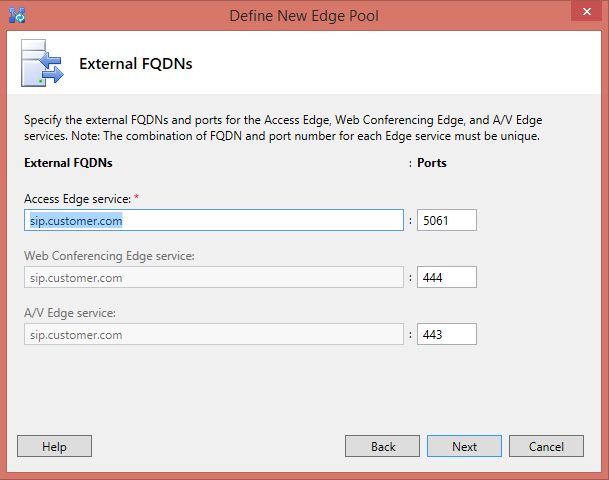
Lync Edge Server FQDN and IP PORTS (Version 1.2, Update 26.11.2014) As we all know, we can configure Lync Edge Server in several way. 1) Single Edge Server with a SINGLE IP ADDRESS 2) Single Edge Server with MULTIPLE IP ADDRESSES (3x IPs) 3) Multiple Edge Server in a Pool, with MULTIPLE IP ADDRESSES (Zx 3 IPs) Regardless what we are going to configure, there are common / well-known TCP Port necessary making Lync work, which are: Access: Port: 443 and 5061 Conferencing: Port: 443 and (444) AV: Port: 443 (I have not listed other ports, e.g. STUN or the dynamic port range. This is not required for the topic discussed here) External FQDN with single IP address: What can we see here? If we are going to choose a single IP address, we would have TCP Port overlapping. Therefore the only way avoiding this is assigning other ports. Additionally we will also see and are reminded that Lync highly depends on DNS. If we have single IP, we must have use single, uniqu...