Posts

Migration von SharePoint nach OneDrive

Image
At Microsoft Ignite we announced a new free, simple, and fast migration solution to help you migrate content from on-premises SharePoint sites and file shares to SharePoint or OneDrive in Office 365. https://docs.microsoft.com/en-us/sharepointmigration/introducing-the-sharepoint-migration-tool

Teams ring headset and desktop at the same time

Image
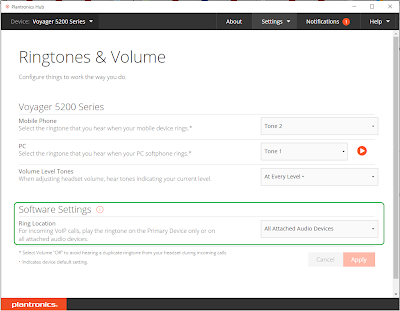
Well, as you know the settings in Teams are different from Skype for Business. Therefore, you must have a proper headset management, like the Plantronics Hub. Here you can set under ringtones & volume, that your headset and any other attached (like desktop) audio devices will play the ring tone.

Calling Icon missing in Teams after Direct Routing is activated

You can support this issue: Configuration Requirement SfB Online + CloudPBX + PSTN Calling Download Weblogs VoiceSettingsService : isTeamsPreferredClient updated. UserAppsStore : Finished adding/filtering static apps UserAppsStore : Calling app removed UserAppsStore : Attempting to add calling with the following flags: isCallingEnabledByTenant =true, isSfbCloud =true, isEvEnabled =true, disableCallingForHybridVoice =true, pstnType =OnPrem, isBusinessVoicePath =false Clear Teams Cache: Clear those locations: %AppData%\Microsoft\teams\application cache\cache %AppData%\Microsoft\teams\blob_storage %AppData%\Microsoft\teams\databases %AppData%\Microsoft\teams\cache %AppData%\Microsoft\teams\gpucache %AppData%\Microsoft\teams\Indexeddb %AppData%\Microsoft\teams\Local Storage %AppData%\Microsoft\teams\tmp %LocalAppData%\Google\Chrome\User Data\Default\Cache %LocalAppData%\Google\Chrome\User Data\Default\Cookies %LocalAppData%\Google\Chrome\User Data\Default\Web Data Inte...

Certificate Requirements Teams Direct Routing SBC

Running Microsoft Teams with Direct Routing for Cloud Voice, you have to deploy a certificate on your SBC. This certificate is used for encryption with TLS. Often there is the question how the certificate must be configured. SBC Public Certificate Requirements All deployed SBCs must have a public certificate from a trusted/supported Public CA, there are 3 options to create a certificate. Security Note: When generating the CSR, the private key size should be at least 2048. Support Note: onmicrosoft.com domain for certificates is not support. Option 1 - Single SBC A certificate with a single SBC FQDN. The SBC FQDN must be in the subject, common name and the Subject Alternate name. SN /CN SAN {Public FQDN of SBC }  {Public FQDN of SBC }   Option 2 - Multiple SBC A certificate with a multiple SBC FQDN’s. The SBC FQDN must be in the subject, common name and the Subject Alternate name, which includes the additional SBCs ...

Teams Direct Routing with SBC Simple Setup

Image
If you want to quickly setup a Microsoft Teams Direct Routing with your own hosted SBC connected to the PSTN. For a smaller, simple scenario you can use this few commands and will be ready within minutes. New-CsOnlinePSTNGateway -Identity sbc.sipdomain.com -SipSignallingPort 5068 -ForwardCallHistory $true -ForwardPai $true -MaxConcurrentSessions 60 -Enabled $true (-Enabled $true will instantly enable the GW for outbound calling allowed) Set-CsOnlinePstnUsage -Identity Global -Usage @{Add="Unrestricted"} New-CsOnlineVoiceRoute -identity "Unrestricted" -NumberPattern ".*" -OnlinePstnGat e way sbc.sipdomain.com -Priority 1 -OnlinePstnUsages "Unrestricted" 1. You create the Online PSTN Gateway, your own SBC and define the SIPSignaling Port and some more parameters, e.g. the maximum concurrent sessions (here 60) 2. Create an unrestricted PSTN Usage, enabling the user, for allowed callings to anywhere  3.  Create a Voice route...

Office 365 Subscription ID and Tenant ID

Image
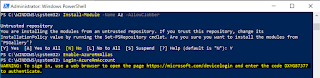
Hi all, I'll very often ask where to find the tenant ID and further the subscription ID in Office 365  Find your Tenant ID Requirements: PowerShell 6.x .NET Framework 4.7.2 Power Shell: Install-Module -Name Az -AllowClobber Connect-AzAccount Update-Module -Name Az Enable-AzureRmAlias Login-AzureRmAccount  Azure Portal: Find your Subscription ID: PowerShell: Set-ExecutionPolicy RemoteSigned $credential = Get-Credential Connect-MsolService -Credential $credential Get-MsolAccountSku | FL

Get Members from Unified Groups

Image
If you wish to read the members from an Office 365 Group/ Unified group you have to use the Get-UnifiedGroupLinks cmdlet. Get-UnifiedGroupLink {GroupName} -LinkType Members $UG = Get-UnifiedGroup Sales Get-UnifiedGroupLinks $UG.Id -LinkType Members