Posts

Microsoft M365 Cross Tenant Migration free eBook

 In this cross-tenant/ tenant-2-tenant migration book, I guide you through the holistic approach, which in deep exercise of Team Voice. I’m working as an Enterprise Solution Architect for Cross-Tenant migration, leading teams with more than 40 persons involved. Technically there are many more aspects, like 3rd party tools vs. Microsoft own solutions and scripts to be written. This book provides you an inside but not providing scripts and detailed configuration. Scripts and configurations are very much an individual approach for each cross-tenant migration. Two very special chapters will be released in 2023, handling and working with Guest User Access and Change & Adoption approach. Both are not only technically important but require a deeper look into their dependencies. Working on an end-2-end overview, technical considerations and understandable working template, this Migration book, it was work consolidated during the last 1 ½ years. DOWNLOAD HERE:  https://www.slidesha...

White Paper to Microsoft TEAMS CROSS-TENANT Migration

Image
Dedicated White Paper to Microsoft TEAMS CROSS-TENANT Migration. The guide includes Teams Team/Channels, private/ personal chat and Enterprise Voice  (Direct Routing) migration explanation and recommendations. It is written for decision maker, project manager and solution architects. Download @ SlideShare  https://www.slideshare.net/thomaspoett/cross-tenant-migration-microsoft-teams

Cross-tenant Shared DNS Space (Native Cross-Tenant Domain Sharing for Exchange Online)

  Cross-tenant Shared DNS Space (Native Cross-Tenant Domain Sharing for Exchange Online)   Upcoming new features, describe and change migration approach, (private preview) Reference: Supporting Mergers, Acquisitions, and Divestitures in Microsoft 365 - Microsoft Community Hub   Microsoft has announced publicly a new expected solution architecture and some of the configuration and management tasks you must perform when utilizing native cross-tenant domain sharing functionality. Below, the step-by-step description to enable cross-tenant domain sharing for a single SMTP domain. (valid as long no major changes are introduced by MS) The domain will be Authoritative in the Tenant where you perform the primary domain management. Up on enablement for domain for cross-tenant domain sharing, you will be able to add the domain as an Internal Relay in additional tenants. An internal Relays is like in Exchange On-Premises relay configuration.     Cro...

Teams Personal Chat Migration into Azure Data Lake

  Personal Chat Migration into Azure Data Lake   Another approach, rudimentary described in the white paper is, migration or better said exporting Teams chat messages into Azure Data Lake solution.   To be said upfront, this is not a solution you or a consultancy company can do, rather you must engage Microsoft (MCS/PSS). This is an internal Microsoft solution using a private API for export.   There are several options on how data can be extracted: -           Single large XML file -           Individual XML files per Teams user There is no other way yet, rather than using XML. Further, you must purchase an Azure VM and Azure Storage. The costs aren’t too high and acceptable. After Chat message extraction, the consolidated XML file will be sent via email or copied into OneDrive.   Talking about user experience. This is not a user-friendly option! As u...

Cross Tenant User Migration Approach and considerations

Image
  Cross Tenant User Migration Approach and considerations In any Tenant 2 Tenant migration the migration approach you have to consider based on: ·        Migration Tools ·        Communication/ Work clusters ·        User and shared data The combination and dependencies of the above will guide you to the best possible decision, how you migrated a tenant and merge it into the target environment. Migration of data is time consuming. We explained the tenant limitation (throttling) in a chapter above. Nevertheless, pre-loading of data into the target tenant is crucial including the sequence required for planning.   Migration Tools There are multiple vendors on the market providing tools, tool sets. They either run on-premises, in Azure or have developed their own cloud-based solution. Principally you will consider a mix of different tools and vendor. Most companies run a h...

Meeting Link Migration for Teams in Cross Tenant

Image
  Meeting Link Migration for Teams Note: both, first user Mailbox/Calendar and Teams must be migrated A 3 rd party tool is required to accomplish a meeting link migration. With Exchange Mailbox migration, all items, including calendar item will be migrated as they are. Calendar item with a link to a Microsoft Team meeting link back to the original Team meeting in the source tenant. The URL is retained. A Teams Channel meeting is not recreated in the target tenant. Those meetings must be rescheduled manually by the channel owner.   How it works (e.g. Quest): The meeting link migration task will create a new Team meeting with the original meeting details in the target tenant. It will set the target user as the organizer. The original meeting migrated to the target will be canceled. The cancellation will be automatically sent out to the organizer and recipients. Meeting Link Migration Considerations Before migrating Teams meetings and their respective link, be awa...

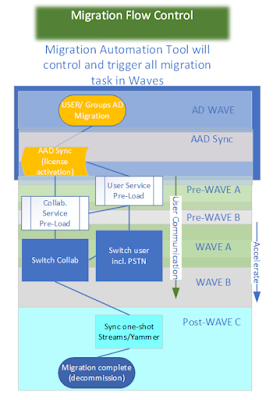
Example of our cross tenant user data migration approach

  Example of our user data migration approach: Important is the completion of your data pre-load for OneDrive and Exchange. Remember, that the pre-load should include as much data as possible. Syncing on the cut-over day data > 10 GB or more than 500 files in OneDrive, might end up with an INCOMPLETE set of data in the target. Therefore, you should urge using the OneDrive Cross-tenant OneDrive Migration tool from Microsoft. The user will than see data being migrated (missing data) upon he starts working in the target environment. This will not be happening with the cross-tenant migration tool. The switch to the target tenant will take approx. 15min. Migration of Teams personal Chat messages, we mostly limit to 15 days. The performance is acceptable migrating approx. 400 – 800 users/day. Note: You should have special procedures in place for legal-hold users, white glove and user object facing issues. Prepare source and target tenant and ensure the readiness for Microsoft...