Teams Guest User Access via ADD management
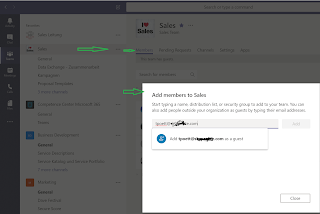
Teams Guest User Access - Invite methods and process. Teams Guest User are member of a Office 365 modern group. There are two ways managing guest access. - Teams Client - Azure AAD You cannot managed, add guest users from within Office 365 groups, if the user isnt added as a guest user in Azure AD. Adding a Guest User from Teams Client The user self managed guest access is handled within Microsoft Teams client. The next illustrations will show you how. It is important, that Guest Access is enabled for your tenant (not show in this guide) Navigate to the Teams (…) and click manage team, from there you can add a guest user by typing his/her external Teams address in the format name@domain Upon the user is added, you will see this user as member in you Team. If you try managing a guest user / adding him/her via Office 365 Groups from you Admin Center, you will see that adding external user isn't possible. The user is shown as "Not Found" ...