Posts

Showing posts with the label Skype for Business 2015 Server

Skype for Business Cumulative Update List (10.03.2017)

Image
It is now the 7th Update (some may say it's CU 7, but it is only called the 7th update, the correct name is:  CU4HF1 ) Note: Windows 2016 Server is not supported for Skype for Business Server 2015 yet. Version Cumulative Update KB Article 6.0.9319.277 February 2017: CU4 HF1 http://support.microsoft.com/kb/3207506 6.0.9319.272 November 2016: CU4 http://support.microsoft.com/kb/3199093 6.0.9319.259 June 2016: CU3 http://support.microsoft.com/kb/3149227 6.0.9319.235 March 2016: CU2 http://support.microsoft.com/kb/3134260 6.0.9319.102 November 2015: CU1 http://support.microsoft.com/kb/3097645 6.0.9319.88 September 2015: RTM HF2 http://support.microsoft.com/kb/3098601 6.0.9319.55 June 2015: RTM HF1 http://support.microsoft.com/kb/3061059 6.0.9319.0 RTM NA Author: Thomas Poett MVP, Business Unit Lead...
Move User from a dedicated Pool via Powershell

Image
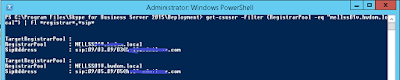
How to move users to different pool or how to migrate user to another pool. Simple and often forgotten: NOTE: The Get-CsUser command do not offer a -Pool or -SourceFQDN parameter! Therefor you need to use pipelining and filtering. Get-CsUser -Filter {RegistrarPool -eq "CurrentPoolFqdn"} | Move-CsUser -Target " TargetPoolFQDN" - MoveConferenceData NOTE: The Option CurrentPoolFqdn and TargetPoolFqdn must be specified in the form of: server.domain.local MoveConferenceData  : Please don't forget moving the users conferencing data stored in the File Share. Note that you should not use the MoveConferenceData parameter if you are moving users as part of a disaster recovery procedure . Instead, you should rely on the backup service for moving conference data as part of a disaster recovery procedure Care about users conferencing ID is not necessary while moving a user to new pool: When you move a user to an Skype for Business or Lync Server 2...

Skype for Business Cloud, Hybrid or OnPremise decision maker

Thanks Jamie Stark (Microsoft) we have finally a slide were we can easily make the right decision for the right approach. Just consider, if you deiced for On-Premise deployment. If you have the Office 365, please always consider the hybrid approach. This let you utilize the Skype for Business Broadcast Meeting feature as well. It is not available, if you didn't set up the hybrid configurations. You can download the PDF from my slideshare: DOWNLOAD Author: Thomas Poett MVP, Business Unit Lead Microsoft Unified Communication  

Skype for Business Meeting Failed: Content was blocked because it was not signed by a valid security certificate

Image
In either Internet Explorer or other browsers you might see this issue finally popping when you try joining a Skype for Business Server Meeting if the Meeting is hosted on Premise, This issue also pop's up with Lync Meeting, not only with Skype for Business Meetings. Error: Content was blocked because it was not signed by a valid security certificate After investigation, I saw this was most likely related to changes in Skype for Business Client Update from Januar 2016: https://support.microsoft.com/en-us/kb/3114502 It implements a new and proper described certificate validation procedure for all SIMPLE URL's. ( Note: This issue can't be replicated each time, therefore you have to consider this as "possible issue" )     As I described earlier in my blog: http://lyncuc.blogspot.de/2015/10/wildcard-certificate-support-in-skype.html It is absolute curial following the infrastructure recommendations from Microsoft, regardless if ...

Shared Line Appearance (SLA) in Skype for Business (with busy on busy)

Very often we as MVP are asked about the Busy-On-Busy feature missing Skype for Business. The native feature for every single device, user or other client is not yet available. And I can't make any announcement until today if this is planned or not. But what I can introduce is the Share Line Appearance , yes here Busy-On-Busy is available. Making S4B more look like an old fashion PBX :) What it the Share Line Appearance. This is a new feature introduced with the actual firmware from Polycom VVX and last Skype for Business Update November 2015. MSFT: Shared Line Appearance (SLA) enables you to configure a group of multiple devices that can each answer calls to a shared phone number (extension). ( SLA it is not supported for Skype for Business clients on computers, mobile phones, or other devices ): What does this mean to us. Well we can use busy on busy only within the VVX configured groups. But not yet between devices and client, or between soft clients. The supporte...

File Share Perfomance for Skype for Business (slow conference join, slow address book)

Once more first. Really make always sure your environment is patched and up to date. Mainly if you have a slow Join Conference user experience. Validate your DFS or File Server. Just what we experienced during certain Skype for Business Updated, as well as support cases is: - Migration is slow - Join Conferencing experience is slow - Address Book generation is slow and more This is, if the Fileshare is not fast enough. What does this mean: You should ensure the IOPS as well as the network throughput is sufficient and not the bottleneck in your environment. Do a measurement on the file servers, see what is happen if DFS replication is kicked in, check if this is share file server, whats happen if other app's access the shares and monitor the IOPS/ bandwidth. Just this is not all, also just perfmon for CPU load, and Memory especially paging. If you experience slow conference joins, it will be the issues, mostly. (Sure the local SQL server also consumes performance ...

Setup Broadcast Meetings in Skype for Business

Image
(Version 1.0: 3rd Nov. 2015) First I start with, broadcast meetings are in an very early stage and introduce only a handful of planned and great feature still coming. Therefore I ask you to read this article frequently seeing the updates will I can blog about. Microsoft introduced Skype broadcast meeting as an individual service aside with Office 365. It requires a dedicated login under: https://broadcast.skype.com/ You can use Skype Broadcast Meetings in both scenarios: - Office 365 only (Skype for Business is 100% in the cloud) - Hybrid Setup Required is: - Azure Password sync or ADFS The Broadcast meeting relays on the Azure Media Services and must be delivered online. From here we are entering the main managing page for broadcast meeting: As you see, the scheduled meetings are visible at this level. They will appear in the three column design. Simply if you need to schedule a new meeting, click the "New Meeting" option and start configuring i...

Skype for Business and SQL Server 2014 licensing

Image
With Skype for Business Server 2015, the usability for SQL Server has advanced once more. We have now a couple of possibilities. Today I'm going to discuss all of them and will advice the actual licensing strategy based on SQL Server 2104 in regards to Skype for Business Server 2015 recommendations. The general licensing guides are available here: http://www.microsoft.com/en-us/licensing/product-licensing/sql-server-2014.aspx One generic topic I have to discuss first. In many cases we are using Hyper Visor technologies, meaning the SQL servers are virtualized. Here one important consideration you should keep in mind. If the SQL Server is virtual AND you use CPU CORE licensing, you can run as many virtual SQL on a single PHYSICAL host as you want. You only need to license the physical CPU of that host. This applies to all physical hosts uses. Say you have 3 VMWare/ Hyper-V physical servers, and you run three SQL server. You will position 1 and 2 on 2 physica...