Posts

Showing posts with the label Personal Chat Cross Tenant Migration

Meeting Link Migration for Teams in Cross Tenant
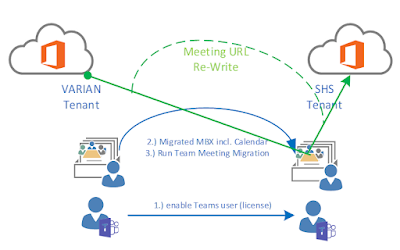
Image
  Meeting Link Migration for Teams Note: both, first user Mailbox/Calendar and Teams must be migrated A 3 rd party tool is required to accomplish a meeting link migration. With Exchange Mailbox migration, all items, including calendar item will be migrated as they are. Calendar item with a link to a Microsoft Team meeting link back to the original Team meeting in the source tenant. The URL is retained. A Teams Channel meeting is not recreated in the target tenant. Those meetings must be rescheduled manually by the channel owner.   How it works (e.g. Quest): The meeting link migration task will create a new Team meeting with the original meeting details in the target tenant. It will set the target user as the organizer. The original meeting migrated to the target will be canceled. The cancellation will be automatically sent out to the organizer and recipients. Meeting Link Migration Considerations Before migrating Teams meetings and their respective link, be awa...
Cross Tenant Migration Options for Teams Chat Messages Destination

Image
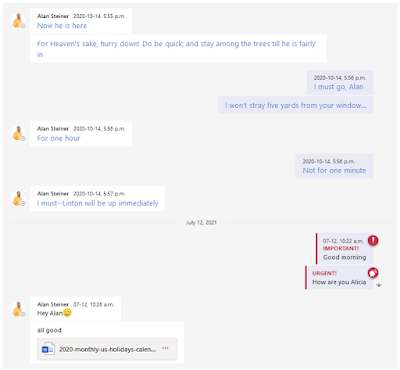
  Migration Options for Teams Chat Messages Destination We take away, that is nearly impossible provisioning Teams personal chat messages on time and along with other personal data migration during the cut-over day. Therefore left is, how or where we can stage the personal chat messages. Generally, the migration consist of two phases, reading and writing the message. Those both processes are individual.   Writing chat messages into the target tenant with all listed possibilities: Write the private chat messages to a folder in Outlook in the target tenant. By doing so, there are limitation for users. Outlook folders will display the messages in the Teams client, nor are those messages searchable or readable from the Teams client. Migrate all the private chat messages from source to the target appear inf in Teams. It is so fare the best user experience option, with the limitation, that the migration account is the ...

Teams Cross Tenant Migration for Personal Chat

Image
  Teams Personal Chat Migration   The largest challenge I have been facing is migrating 1:1 chats from one Teams tenant to another . 1:1 Chat Migration is extremely slow. Guess you have experienced this while using Teams App. If you scroll within a chat and reached the non-cached messages, they are pulling very slow. This is what you will experience upon execution of Chat messages. Additionally complex is the availability of shared files. If OneDrive isn’t fully sync’ed, placing the sharing information is impossible. This indicates the sequence for user service migration. Let’s list the three major challenges in personal chat migrations:   1.       Counting the Private Messages Teams has no out-of-the-box possibility counting the personal/ group chat messages. You could write a script using the GraphAPI:   getTeamsUserActivityCounts method A limitation exists here, it can only return the number of messages in a specified perio...