Posts

Teams PowerShell download
Image
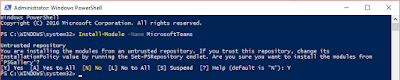
Microsoft Teams PowerShell 0.9.0 Teams Cmdlets module Inspect PS> Save-Module -Name MicrosoftTeams -Path <path>    Install: Open a Windows PowerShell console. Run the Install-Module cmdlet as shown here. PS> Install-Module -Name MicrosoftTeams -RequiredVersion <version> MS Teams cmdlets: Add-TeamUser Get-Team Get-TeamChannel Get-TeamFunSettings Get-TeamGuestSettings Get-TeamMemberSettings Get-TeamMessagingSettings Get-TeamHelp Get-TeamUser New-TeamChannel New-Team Remove-Team Remove-TeamChannel Remove-TeamUser Set-TeamFunSettings Set-TeamGuestSettings Set-TeamMemberSettings Set-TeamMessagingSettings Set-Team Set-TeamChannel Set-TeamPicture Connect-MicrosoftTeams   Sample: Connect-MicrosoftTeams -AccountId you@domain.com $group = New-Team -alias "ProductA" -displayname "Product A Planning" -AccessType "private" Add-TeamUser -GroupId $group.GroupId -User " user01@domain.com ...
Hide users from address book in Skype for Business

SfB On-Premise is making use of the Exchange GAL. If you don't want users or other resources to appear in address book / GAL search in the Skype for Business client there is an easy way. Hiding contacts from GAL, by changing an AD related attribute. This could be e.g. hiding Helpdesk Team Members This is the Exchange attribute for hiding users from the Global Address List (GAL). If this is set to TRUE, which indicates it doesn’t need to appear on the GAL, Lync will also ignore this user for the Address Book. This sets the attribute "msExchHideFromAddressLists" to True. It also clears the attribute "ShowinAddressBook"  This is the Script: $users = Get-CsAdUser -Filter {name -Like "*HelpDesk*"} foreach ($object in $users)     {       Set-ADObject -Add @{msExchHideFromAddressLists=$true} -Identity $object.DistinguishedName       Set-ADObject –clear ShowinAddressBook -Identity $object.Dist...

Violation of Terms of Service Disable in Process - Phishing Mail

Dear friends and my blog reads! if you receive and mail like this. PLEASE IGNOR. This is a Phishing attack mostly not from your Tenant. But it would not be wrong, if you let all users change their passwords. The link below has been changed and is therefore save. Cheers Thomas ---------------------------------------------------- From: Microsoft Office [ mailto:office@microsoft ] S end: Freitag, 20. Oktober 2017 16:45 To: SfB USer Group NRW <sfbusergroup-NRW@mytenantdomain.de> Subject: Violation of Terms of Service Disable in Process Microsoft Office365 Dear Sfbusergroup-nrw If these disable modifications were made without your consent, please log in to your email setting by checking blow office365 Cancel Disable Process Thanks for taking these additional steps to keep your email safe. Privacy | legal notices Microsoft Office Boulevard, Suite 200 13031 West Jefferson Los Angeles, CA 90094 USA You...

Skype for Business 2015 and Skype for Business Online Licenses, MS Teams included

Skype for Business 2015 and Skype for Business Online Licenses. Please ask if you have further question. I'm happy helping you in understanding it. https://technet.microsoft.com/en-us/library/skype-for-business-online-service-description.aspx

Outlook 2016 Pro Plus freezing with Windows 10

Image
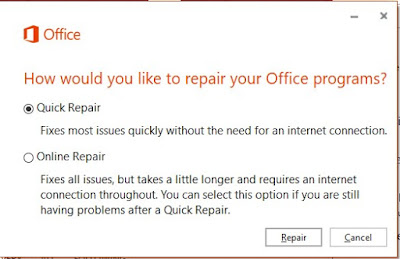
With the recent update to Windows 10 Creators Update, a lot user have some issues with Office 2016 Pro Plus Click-2-Run. This is due to changes made in Windows 10 Core with directly impact Office Pro Plus. One of this issue is that Outlook 2016 is freezing after certain time, mostly if you try replying to an Email.  You could only fix this once you kill the Outlook process and restart Outlook (either /safe safemode) and restart Outlook again. The solution update your Office 2016 Pro Plus will also not solve this problem. Change made to Windows 10 require a REPAIR task to Office Pro Plus. Navigate to " Feature & Apps " and click MODIFY Office 2016 Pro Plus, chose repair The Option : - Quick Repair will mostly fix the issue already. - Online Repair , will with download from MS Cloud fix def. your problems.

OneNote Screen Clipping not working with Windows 10 Creators Update

Image
Microsoft wants you working different ;) Or in other words, both teams Office and Windows did align. Here is what to do: If you can disable Windows Sniping Tool Group Policy follow the screen shot Than or change your Hot Key : HEX 83 is the default Key WIN+SHIFT+S and or you might fully disable the Global Windows Hot Key WIN+S reg.exe add HKEY_CURRENT_USER\Software\Microsoft\Windows\CurrentVersion\Explorer\Advanced /v DisabledHotkeys /t REG_SZ /d S /f Reboote your computer now it should work as usual and you can work proper with OneNote again.  

Microsoft Teams Bandwidth Calculator

Image
Bandwidth Calculator for Microsoft Teams The Bandwidth Calculator for Microsoft Teams provides you with an estimate of the expected bandwidth generated by Microsoft Teams within your organization. By inputting your user count and expected behavior, the resulting calculation will better prepare you to successfully leverage Microsoft Teams in your environment. The Bandwidth Numbers generated are based on typical bandwidth values and will provide a starting point for further optimization. Should you want to learn more about aligning the tool more to your specific needs and the possible caveats, you can find further explanation about the tool is added below or watch our training recording here:  Thomas Binder (former microsoft) the Calculator can be download at: Use the Network planner for Microsoft Teams - Microsoft Teams | Microsoft Docs